Arduino Launcher for the KDE menu
- August 17th, 2007
- Posted in Arduino . Software
- By Carlitos
- Write comment
The Arduino software is good and works very well under Linux. Nevertheless, it doesn’t create a menu item when installed and it can be tricky to create one for those who are not very used to Linux (like me).
In order to add a KDE menu launcher for the Arduino software, open the KDE Menu Editor, create a new item and put
cd /opt/arduino-0007/; ./arduino
in the Command field. Also, make sure that Run in terminal is checked and replace /opt/arduino-0007/ by your own installation path.
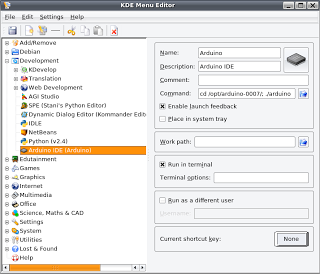 I’m sure there are thousands of other ways of doing this (including many than only require a few commands in the terminal) but at least this ways is pretty simple and and can be done without knowing that much about Linux.
Easy AdSense by Unreal






I tried your method, but since i use gnome it did not work. however with a little probing i figured out two different way’s to accomplish this in gnome.
One is to use this launcher command:
bash -c “cd /home/andrew/arduino-0012/; ./arduino”
and the other way was to create a script with the following code, rename it to “arduino”, and copy it to /usr/local/bin
[code]#!/bin/sh
cd /home/andrew/arduino-0012
./arduino
[/code]